Join Hoang Bao Khoa for an in-depth overview of MobileConnect, including system operation, network requirements, smartphone compatibility, latency performance, and how to integrate MobileConnect into your meeting or conference audio system.
MobileConnect Station: connectivity, configuration and deployment
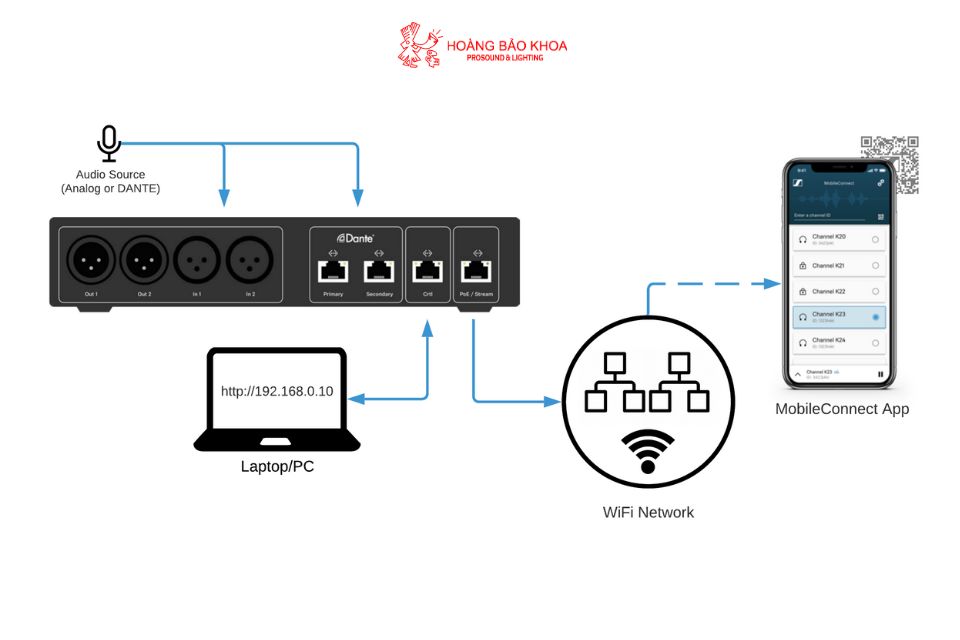
The MobileConnect Station is the core processing and streaming distribution unit within the entire MobileConnect system. It receives audio signals from the Mixer or a central control system and streams them directly over the local LAN network. This device determines overall performance, latency, and the audio quality delivered to listeners.
Supported audio protocols
The Station supports two primary connection formats:
- DANTE: for professional IP-based audio infrastructures, offering high stability and scalability. DANTE enables transmission of multiple high-quality audio channels over a single network line.
- Analog XLR: used when DANTE is not available. Simple connectivity, typically deployed in smaller venues or traditional audio systems.
Latency performance with MobileConnect
Latency is a critical factor in applications such as assistive listening, simultaneous interpretation or real-time monitoring. MobileConnect delivers low latency thanks to its optimized audio-over-WiFi streaming engine.
Key factors affecting latency include:
- Mobile device hardware: different smartphones process audio with varying efficiency.
- Headphones: Bluetooth headphones typically add 100 - 200 ms of latency compared to wired headphones.
- WiFi infrastructure: high-end routers and wide bandwidth improve system stability.
- Distance to WiFi access points: closer proximity ensures more reliable signal quality.
WiFi requirements
WiFi is the operational backbone of MobileConnect, therefore the network must meet several standards:
- Enterprise-grade WiFi: preferable for venues with multiple access points and high concurrent user capacity.
- Dedicated SSID for MobileConnect to optimize streaming performance.
- Minimum 20 Mbps bandwidth per Station.
- Professional routers/switches to avoid congestion under heavy load.
Audio channel management
MobileConnect enables management of multiple audio channels via the admin app or web interface. Each channel can be assigned a name, QR code and description for easier selection within the user app.
Channel creation is typically used for:
- Multilingual interpretation: each language assigned to a separate channel (up to 2 channels per Station).
- Assistive listening: a dedicated EQ-optimized channel for hearing-impaired users.
- Independent content feeds: such as teacher vs. teaching assistant channels in lecture halls.
MobileConnect App
The MobileConnect App is installed directly on users’ smartphones and supports both iOS and Android. The interface is minimalistic, intuitive and allows:
- Quick connection via QR code scanning.
- Channel selection from the available list.
- Personal volume, EQ and listening mode adjustments.
Security & access control
MobileConnect provides several security configurations to ensure safe content distribution:
- SSID restriction: only devices within the internal network are allowed access.
- Access control: limit streaming access to specific user groups.
- Disable public channel listing: channels become accessible only via QR code for higher confidentiality.
This is particularly important in government facilities, training environments or conferences involving sensitive content.
Case study: MobileConnect deployment for multilingual conferences
Consider a conference center with three parallel meeting rooms, each requiring two interpretation channels. With MobileConnect:
- Three MobileConnect Stations are installed, each handling two language channels.
- Participants scan the QR code in each room using their smartphones.
- No distribution of traditional IR/FM receivers or headphones is needed.
- Organizers significantly reduce staffing and maintenance costs.
Maintenance & updates
The Station supports automatic or manual firmware updates via the admin interface. Updates improve latency, stability and add new features. Sennheiser recommends checking firmware versions regularly to ensure compatibility and peak performance.
Conclusion
MobileConnect is a comprehensive WiFi audio streaming solution, optimized for assistive listening, simultaneous interpretation, education and professional presentations. With scalable architecture, centralized management and robust security, it is an ideal choice for auditoriums, conference centers, theaters and modern lecture halls. When deployed on a properly engineered network infrastructure, MobileConnect delivers clear, stable and reliable audio to all users.
{SanPham}