The causes of wireless audio interruptions are often related to antennas, cabling, and basic frequency coordination. However, in real-world operation, especially in large stages, auditoriums, convention centers, or outdoor events many signal loss issues originate from the surrounding RF environment rather than directly from the equipment itself.
This article takes an in-depth look at environmental factors, radio frequency interference (RFI), squelch settings, transmitter power levels, and advanced practical techniques to ensure stable operation of Sennheiser wireless microphone systems in complex RF conditions.
1. RF environment and common sources of interference
The RF (Radio Frequency) environment is becoming increasingly “crowded” due to the growing number of wireless transmission devices operating alongside wireless Microphones.
Common sources of RF interference include:
- Wi-Fi routers and access points located near the stage area
- Bluetooth devices and wireless HDMI transmitters
- Wireless cameras and intercom systems
- Low-quality LED stage lighting that generates RF noise
- Wireless transmitters operated by other production teams at the same event location
When a receiver continuously detects unwanted RF signals, the system may experience audio dropouts even though the Microphone itself is functioning normally.
2. RFI (Radio Frequency Interference) and how to identify it
RFI occurs when RF signals from external sources overlap with or overpower the signal of a wireless microphone. This type of issue is difficult to diagnose because the system may operate normally for a period of time before audio suddenly drops out.
Common signs of RFI include:
- Intermittent and unpredictable dropouts
- Audio loss when additional electronic devices are powered on
- High RF level indication on the receiver while audio is muted or interrupted
In these cases, simply replacing cables or changing antennas is often insufficient; a comprehensive RF configuration optimization is required.
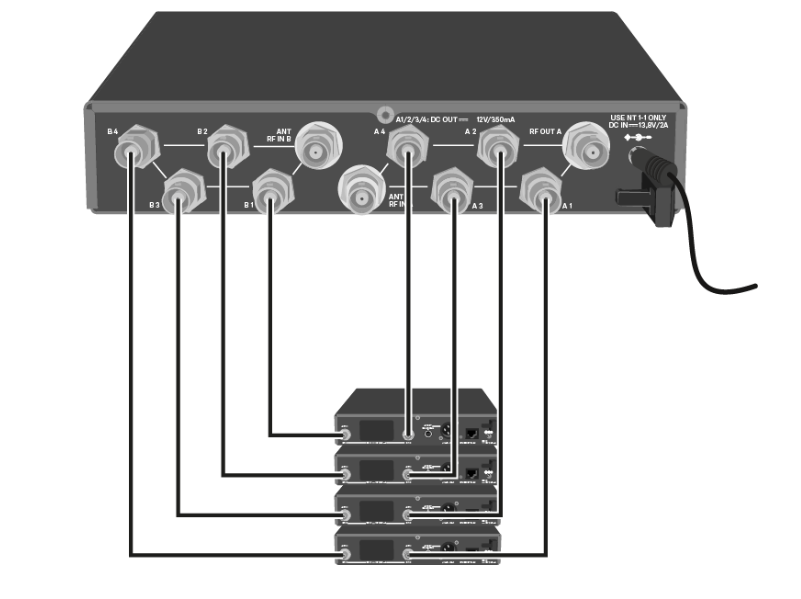
3. Distance, transmit power, and user position
The relationship between distance, RF transmit power, and the operating environment has a direct impact on system stability.
Key considerations include:
- Excessive distance between the transmitter and receiver weakens the RF signal
- The user’s body or hand covering the antenna significantly reduces signal strength
- Large metal structures (truss systems, LED walls) cause RF reflections and signal distortion
Always try to maintain line of sight between the transmitter and the receiving antennas, especially on large stages.
4. Squelch settings and their impact on dropouts
Squelch is a mechanism that mutes the audio output when RF signal strength drops below a defined threshold, helping to prevent background noise. However, incorrect squelch settings can lead to dropouts.
Squelch set too high
- The receiver requires a very strong RF signal to open the audio path
- Audio may drop out easily when the user moves farther away or blocks the antenna
Squelch set too low
- The receiver opens audio even with weak RF signals
- Unwanted noise or interference may become audible
It is recommended to use the manufacturer’s default squelch settings or adjust gradually based on real-world conditions.
5. Interference from electrical equipment and stage lighting
stage lighting systems, dimmers, and high-power switching power supplies indirectly degrade the overall RF environment.
Practical experience shows that:
- Receivers and antennas should not be placed near dimmers or high-power electrical sources
- Avoid running RF cables parallel to AC power cables
- Use high-quality, low-loss RF cables
These factors may not cause immediate dropouts but can significantly reduce long-term system stability.
6. Managing wireless systems in complex environments
When operating multiple wireless systems simultaneously (microphones, IEMs, intercoms), comprehensive RF management becomes essential.
Important recommendations include:
- Separate frequency ranges for microphones and IEM systems
- Perform RF scans before every event, even at familiar venues
- Document and save frequency configurations for each production
7. When should you consider upgrading the system?
If dropouts continue to occur frequently despite optimized antenna placement, frequency coordination, and RF environment control, upgrading the system should be considered.
Signs that an upgrade may be necessary include:
- An increasing number of wireless channels
- Large stages with long transmission distances
- Exceptionally complex RF environments
Systems such as Sennheiser EW-DX, featuring advanced RF management and frequency coordination capabilities, can significantly reduce the risk of wireless audio dropouts.
Hoàng Bảo Khoa is an authorized distributor of Sennheiser products in Vietnam, providing comprehensive solutions for professional stages, auditoriums, and live events.
Customers purchasing Sennheiser equipment from hoàng bảo khoa receive:
- Complete CO/CQ documentation and VAT invoices
- Official manufacturer warranty
- Technical consultation and wireless system configuration support
- Assistance with inspection and troubleshooting of wireless audio dropouts
Conclusion
Wireless audio dropouts are not caused solely by equipment issues; they are most often related to RF environment conditions, interference, and improper system configuration. Understanding RFI, squelch behavior, transmission distance, and overall RF management enables proactive prevention and effective troubleshooting. Combining genuine Sennheiser equipment, correct technical setup, and support from an authorized distributor is the key to achieving long-term wireless system stability.
--