In Sennheiser wireless microphone systems such as EW-D or EW-DX, you may occasionally experience temporary signal loss (dropouts) during operation. This issue can significantly affect performers and sound engineers, especially in live sound environments or large-scale events.
This article analyzes the most common causes of wireless audio dropouts and provides a step-by-step troubleshooting process, from antenna setup to RF frequency coordination. The content applies to most current Sennheiser wireless systems and can also serve as a reference for other professional wireless audio systems.
1. Antenna placement and type
One of the most common root causes of signal dropouts is improper antenna placement or the use of an antenna type that is not suitable for the operating environment.
Checking antennas and RF signal
- Ensure that the antenna is firmly connected to the receiver. Loose connections can cause immediate signal loss.
- Maintain clear line of sight between the transmitter and receiver whenever possible; avoid large obstacles such as walls, stage structures, or LED screens.
- Place the transmitter closer to the receiver as a quick test to determine whether distance is the main issue.
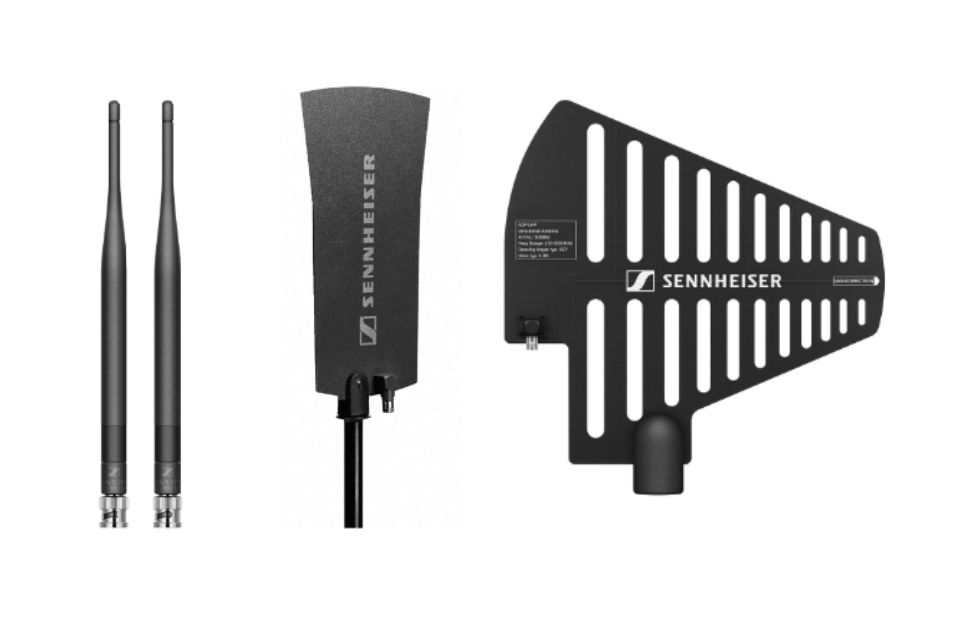
Choosing the correct antenna type
Depending on the usage environment, each antenna type serves a different purpose:
- Quarter- WAVE antenna: Standard antennas supplied with many wireless systems, offering omnidirectional reception and suitable for small setups; not recommended for large antenna distribution systems.
- Half- WAVE dipole antenna: Twice the length of a quarter- WAVE antenna, providing improved gain and extended operating range.
- Passive omnidirectional antenna (e.g. A1031-U): 360-degree coverage, suitable when transmitters are constantly moving.
- Passive directional antenna (e.g. ADP UHF): Focuses reception in a specific direction, increasing stability over longer distances.
In complex systems running multiple wireless channels simultaneously, the use of an antenna distribution system helps reduce intermodulation and improves overall RF signal clarity.
2. Check and replace cables
Damaged RF or audio cables, loose connectors, or poor shielding are simple yet very common causes of signal dropouts.
- Power off the system and replace each audio cable between the receiver and the mixer/PA one by one to rule out physical faults.
- Perform the same process with RF cables between antennas, splitters/combiners, and receivers.
- Use high-quality cables with proper shielding to ensure stable signal transmission.
3. Issues when using multiple wireless systems simultaneously
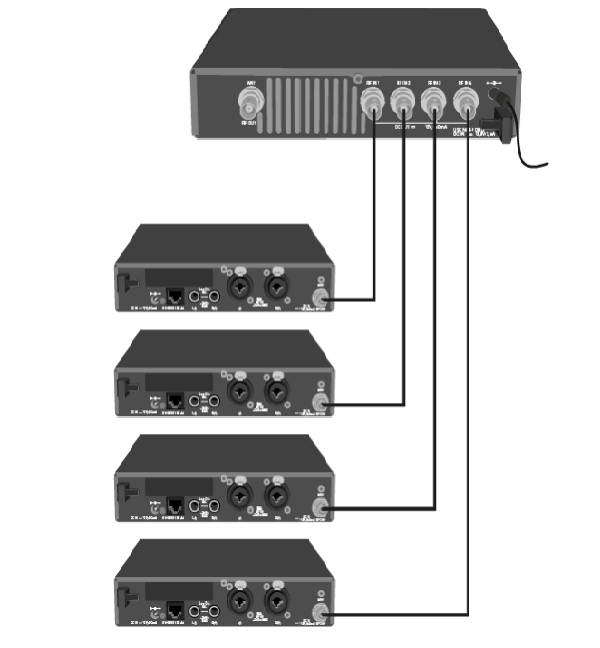
When operating multiple wireless systems at the same time, intermodulation may occur if antennas are placed too close together or if frequencies are not properly coordinated.
Step-by-step troubleshooting procedure
- Power on only one wireless system to check basic stability.
- Add each additional system one at a time, synchronizing and checking for clean frequencies.
- If dropouts occur only when multiple systems are active, the issue is usually related to antenna placement or RF frequency coordination.
Note: Antenna splitters cannot be daisy-chained and must operate in parallel when using more than four systems.
4. Frequency coordination and management
Using congested or overlapping frequencies is a very common cause of signal loss in complex RF environments.
Sennheiser Wireless Systems Manager (WSM) software allows you to:
- Scan the local RF spectrum to identify clean frequency ranges.
- Select RF banks and channels that avoid intermodulation.
- Separate frequency ranges between wireless Microphones and IEM systems when used simultaneously.
Proper frequency coordination is especially critical in environments such as large auditoriums, concerts, or outdoor events with high RF device density.
5. Quick checklist for handling dropouts
- Check antenna placement and type, ensuring line of sight whenever possible.
- Inspect and replace RF and audio cables step by step.
- Test each wireless system individually.
- Scan and coordinate frequencies using professional software to avoid conflicts.
Conclusion
Audio dropouts or signal interruptions in wireless Microphone systems are most commonly caused by antenna issues, cabling problems, multi-system deployment, or improper RF frequency coordination. Following a logical, step-by-step troubleshooting process allows technicians to quickly identify the root cause and restore stable system operation.
Authorized distribution and service center
Hoàng Bảo Khoa is an authorized distributor and official Sennheiser service center in Vietnam, supplying a full range of wireless microphones, headphones, transmitters, receivers, and Professional Audio equipment. All products include complete CO/CQ documentation, clear warranty policies, and reliable technical support.
For Sennheiser wireless microphone systems, the technical team at hoàng bảo khoa provides consultation and proper system setup tailored to each model and real-world application, helping ensure optimal RF performance and stable operation.