One of the biggest challenges for home-based streamers is unwanted background noise. Traffic, air conditioner fan noise, and room reflections can all be picked up by the microphone, reducing audio clarity and making your livestream sound less professional. To achieve clean, studio-quality audio, it is essential to optimize your recording environment and choose the right microphone for your setup.
Common Causes of Noise in a Home Livestream Studio
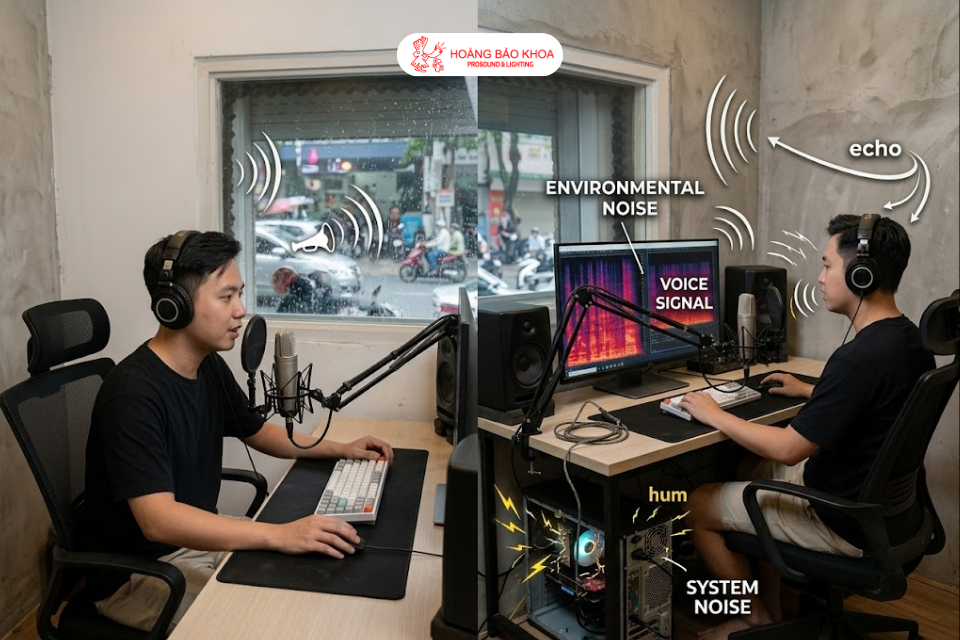
Before solving the problem, it is important to identify the most common sources of unwanted noise so they can be eliminated at the source. In general, noise in a home livestream studio falls into two main categories:
- Environmental noise and sound reflections: Traffic, rainfall, or conversations from nearby rooms can easily be picked up by the Microphone. In addition, an empty room allows sound WAVES to bounce off hard surfaces and return to the microphone, creating echo that makes the voice sound muddy and unclear.
- System-generated technical noise: Low humming sounds from computer cooling fans or buzzing caused by poor-quality audio cables picking up electromagnetic interference from nearby electronic devices.
Many people believe that installing noise reduction software alone is enough. However, when software algorithms are forced to work too aggressively, they often remove parts of the natural frequency range, making your voice sound distorted and robotic.
Eliminate Noise at the Source with Behringer Hardware
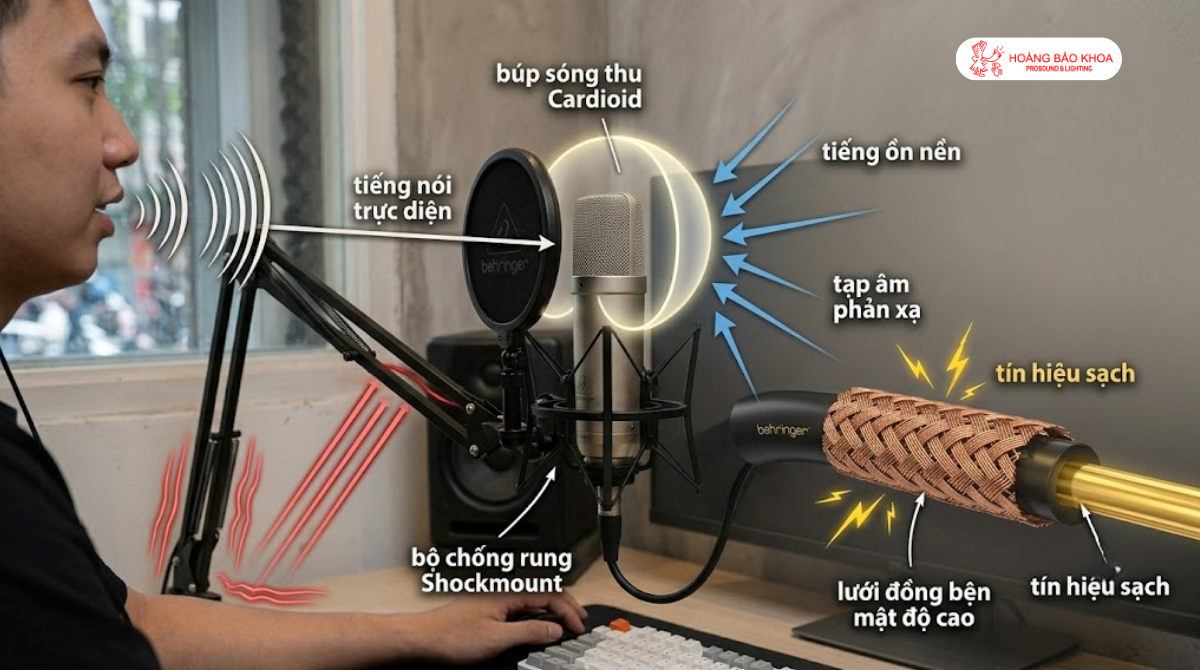
To solve these issues effectively, the audio engineers at Hoang Bao Khoa recommend using dedicated Behringer hardware designed to physically minimize unwanted noise:
- Use a cardioid Microphone: Popular recording Microphones such as the Behringer C-1 or the Behringer SB 78A dynamic microphone feature a cardioid pickup pattern that focuses on capturing sound from the front while rejecting noise from the sides and rear. This design can significantly reduce background noise during livestreams.
- Add a shock mount and pop filter: Professional large-diaphragm microphones like the Behringer TM1 include an elastic shock mount and a metal pop filter. This combination minimizes mechanical vibrations from the desk while reducing plosive sounds produced during speech, resulting in smoother and cleaner vocal recordings.
- Use shielded audio cables: Electronic interference can be greatly reduced by using professional Microphone cables such as the Behringer GMC-300CM or Bespeco cables made in Italy. Their thick PVC insulation and high-density braided copper shielding help preserve a clean audio signal from the microphone to the audio interface.
Eliminating unwanted noise with dedicated hardware provides a solid foundation for improving the overall quality of your livestream setup. Contact hoang bao khoa to receive expert advice on selecting the most suitable noise-reducing microphone configuration for your budget.